
 Upgrade to PRO
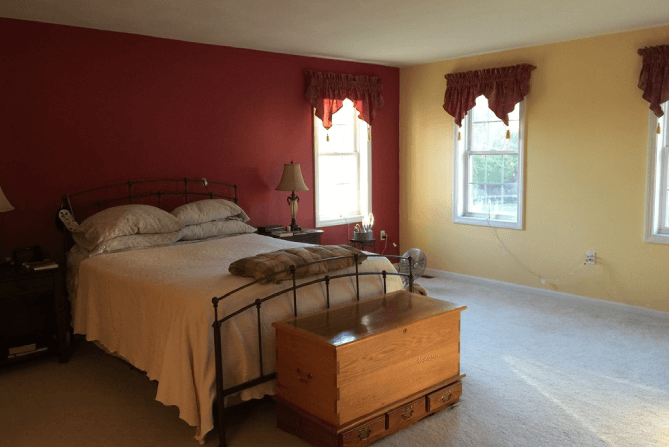
Reimagine Any Room in Seconds with AI
Transform every detail of your room into what you’ve been dreaming of, all in just a few clicks with our intuitive AI design tools.
Start Designing Your Room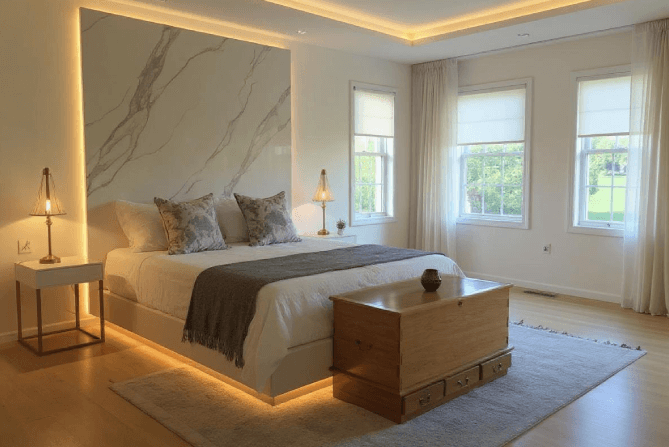
Used by Employees of














Revamp Your Room in Minutes
Give any space a fresh look in just a few clicks. Whether you’re planning a full makeover or experimenting with new layouts, our AI keeps room design quick and inspiring.

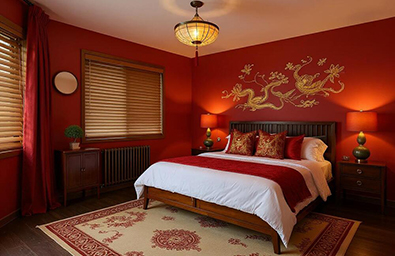
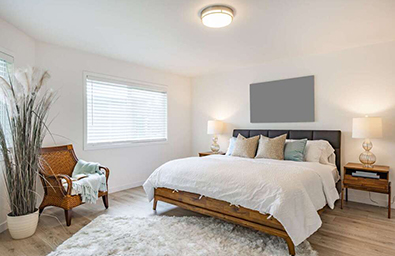
120+ Interior Styles, Endless Mixes
Pick from more than 120 interior styles and prompt the AI with what you want to explore. Experiment with limitless combinations until the room feels perfect.

Pin-Point Tweaks in Real Time
You can change paint colours, swap flooring, furniture, adjust lighting, or change anything in your room at a time. Every update renders in seconds, so you can fine-tune every detail until your room looks exactly like you imagined.
Customize Your Room Your Way
We put every option at your fingertips, mix, match, and tweak anything from wall colour to accent furniture in seconds until the space feels unmistakably yours:

Choose Any Color
Start with any style you want from our library. One click sets the overall look.

Tell the AI What You Want
Type anything you need, from blending two styles to adding a specific feature, our tool applies your request in seconds.

Remove What You Don’t Love
Delete any furniture or décor with one tap to keep the room clutter-free.

Re-colour & Re-material
Swap paint, fabrics, or surface textures with your own textures instantly until the palette feels perfect.

Replace Floors & Walls
Test hardwood vs. tile or try new wall finishes without lifting a brush.

Fine-Tune Every Detail
Change individual furniture pieces, elements, or zones so every corner of the room matches your vision.
Who Can Benefit from Our AI-Powered
Room Design Tools?
Whether you're crafting a dream kitchen, designing custom storage, or renovating a home, our cabinet design tools cater to a wide range of needs:

Homeowners
Visualize paint, furniture, and layout changes before you spend a dime.

Renters
Test temporary décor ideas virtually, with no risk to your security deposit.

Interior Designers
Produce polished concepts in minutes and accelerate client approvals.

DIY Enthusiasts
Experiment with colours, layouts, and up-cycling ideas without guesswork.

Real-Estate Agents
Virtually refresh dated rooms to make listings stand out and sell faster.

Home Stagers
Stage empty or cluttered spaces with photoreal updates that captivate buyers.

Contractors & Builders
Show clear design options up front and avoid costly mid-project changes.

Furniture & Décor Retailers
Let shoppers “try on” pieces in realistic rooms to boost confidence and sales.

Property Developers
Offer style packages for new builds and speed up buyer decisions.

Content Creators
Generate eye-catching room backdrops for videos, photos, and live streams.
Design Your Dream Room
in 3 Simple Steps

Choose Your Tool and Your Room
Select the space you’re working on (bedroom, living room, office, etc.) and pick the module that fits your goal.

Set Your Preferences
Select and prompt all the details that matter, such as favourite styles, colour palette, materials, must-have pieces, or an inspiration photo, to guide the design exactly where you want it.

Generate & Refine
Click “Generate” to see your new room in seconds. Jump into other tools, swap styles, move furniture, and adjust finishes until every corner looks perfect.
Trusted by Millions Across the Globe

7.27M+
Completed Projects
Our users are bringing thousands of projects to life every day with our advanced AI.

63124+
Professional Users
Homeowners and professionals are using our AI models daily to save time and money.

80+
Home Design Styles
Growing range of diverse design styles. Custom styles are available upon request.

170+
Countries
Market leader in AI-powered home design, trusted by users in over 170 countries.
Rooms Reimagined,
Lives Transformed
Thousands of homeowners, renters, and design pros rely on HomeDesignsAI to turn blank rooms into personalized, functional spaces they love.

2.40M+ users can't be wrong.
Let the AI do the magic for you.

 Outstanding AI Instrument!
This AI is genuinely extraordinary, a perfect instance of well-executed artificial intelligence. It's simple to handle for anyone needing a graphical advantage. The results are incredibly authentic, often impossible to distinguish from genuine, real-world blueprints.
 Bathroom Design Renewed
HomeDesigns AI was crucial in helping us visualize our new washroom, providing a much clearer final product and even proposing more inventive choices and layouts than we initially contemplated. We are currently utilizing it for our living room overhaul. 5 stars!!
 So many fresh ideas
I am delighted with the proposals for transforming my indoor areas into a sleek, current aesthetic that harmonizes flawlessly with the items I already own in my flat. Fantastic!
Effortless to manage
The vast selection of various styles accessible allows for limitless imaginative capability. I especially value the function to adjust the intensity level for different kinds of modifications. Extremely user-friendly.
Common Questions
How do I start redesigning a room with this tool?
Upload a photo of your current (or empty) room, tell HomeDesignsAI what you’d like, style, colours, specific changes, and it instantly turns those instructions into a realistic design you can refine in seconds.
Can I furnish a bare room from scratch?
Yes. Drop in the empty room photo and our engine will add furniture, décor, and colours that match your brief, so you can visualize a finished space before buying anything.
How specific can my style requests be?
Choose a primary style to set the overall vibe, then tell the AI to layer in elements from other styles, all at once or one tweak at a time. Type what you want and we’ll apply it in seconds.
What if I don’t like something the AI adds?
One click removes any item, sofas, lamps, art, you name it. Replace, move, or delete pieces until the room feels perfect.
Can I experiment with paint colours, floors, and fabrics?
Yes. Change wall colors, flooring options, and textiles instantly. Keep mixing until the palette fits your vision.
Are the images sharp enough for client presentations?
Yes, especially when you click the HD button. Our high-resolution renders give designers and builders the clarity they need for proposals, mood boards, and approvals.
Does it work for any room type or shape?
Yes, bedrooms, living rooms, home offices, studios, etc. Simply pick the room type when you start, upload a photo of the space, and our AI tailors the design to its exact proportions.
Can I upload my own materials or textures?
Absolutely. Snap a picture of fabric swatches, flooring, or paint chips and upload it; we’ll map the texture onto walls, floors, or furniture in seconds.
Do I need design experience to use it?
Not at all. The interface is simple: point, click, and adjust. The AI does the heavy lifting.
Can I make pinpoint edits like adding or replacing just one item?
Yes. Select our Precision+ tool to target a specific area of the room, swap in a new piece, or remove something entirely without altering the rest of your design.



Available only for Premium members.
If you want to use the premium features you must first upgrade your license.

Make sure you add an Input Image!
 Need More Credits?
Join our exclusive webinar to get 10 more free credits – and discover how to get better results with our tools and turn your designs into income.
Learn how to monetize your AI creations by working with clients directly or selling your services on platforms like Fiverr and Upwork.
Or, skip ahead and unlock unlimited creativity with a premium plan.


 Checkout
Add this Add-On To HomeDesignsAI:

Unlimited AI Designs (One Time Fee)
Pay once for limitless generations.
Add this $19 one-time upgrade to remove the generation limit on your account. Create unlimited designs, renders and briefs across all 20+ HomeDesignsAI modules. ?