
 Upgrade to PRO
Turn Sketches into Stunning Visuals
with AI
Bring your rough ideas to life with photorealistic renders in just seconds.
Try Sketch to Render Now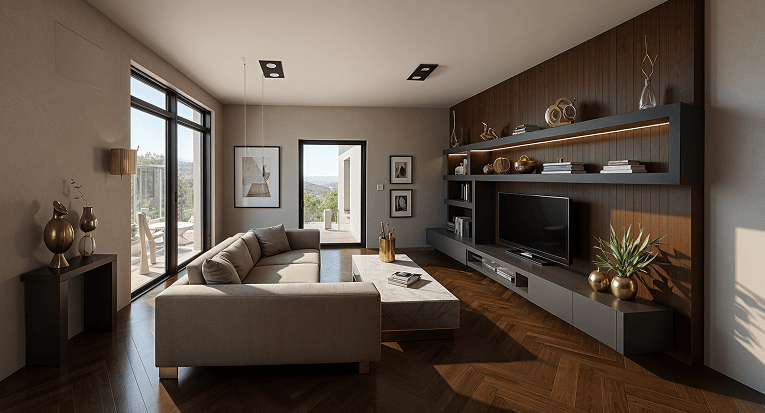
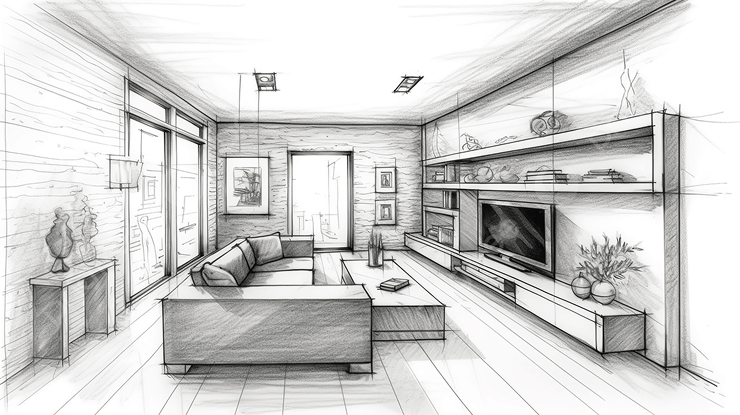
The Sketch to Render tool transforms hand-drawn sketches and basic outlines into highly detailed, realistic visuals. Whether you're an architect visualizing a concept, an interior designer presenting an idea, or a homeowner experimenting with a new space, this AI-powered tool brings your designs to life with stunning accuracy and depth.
Used by Employees of












How Sketch to Render Works

Upload Your Sketch
Start by uploading a hand-drawn sketch, digital outline, or floor plan. The AI will analyze the structure and layout of your design.

Select Your Space Type
Choose whether your design is for an interior, exterior, or outdoor space. This helps the AI apply the right enhancements.

Choose a Design Style
Pick from a wide range of design styles, or provide specific instructions to guide the AI in creating a render that matches your vision.

Generate Your Render
Click ‘Generate’ and watch as the AI transforms your sketch into a detailed, photorealistic design. Review the results and refine if needed.
Watch: From Sketch to Stunning in Less Than 2 Minutes
A quick tutorial showing how to transform rough sketches into high-quality renders.
Who is Sketch to Render Perfect For?
The Sketch to Render is perfect for:

Homeowners & DIY Enthusiasts
Visualize renovations or custom layouts before committing to changes.

Interior Designers
Showcase design concepts with photorealistic previews.

Real Estate Agents
Enhance property listings with highly detailed renders.

Event Planners
Plan and visualize venue layouts in realistic detail.

Architects
Convert conceptual drawings into professional, client-ready renders.

Construction Companies
Use AI-generated renders to streamline communication between contractors, designers, and clients.

Homeowners & DIY Remodelers
Easily visualize renovations before making any real-world changes.

Artists & Concept Designers
Generate high-quality 3D renders of their design concepts for portfolios or presentations.

Furniture Designers
Convert product sketches into detailed digital models for presentations.
From Concept to
Reality with AI

Instant Transformation
Convert basic sketches into lifelike, detailed images in just a few clicks.

Photorealistic Textures
AI applies realistic materials, lighting, and depth to bring ideas to life.

Easy Customization
Personalize colors, styles, and finishes to match your vision.

Professional Quality Renders
High-resolution results suitable for presentations, portfolios, and real-world applications.
Sketch to Render is Revolutionizing Design
Join professionals and creatives using AI to elevate their design process.

2.40M+ users can't be wrong.
Let the AI do the magic for you.

 Outstanding AI Instrument!
This AI is genuinely extraordinary, a perfect instance of well-executed artificial intelligence. It's simple to handle for anyone needing a graphical advantage. The results are incredibly authentic, often impossible to distinguish from genuine, real-world blueprints.
 Bathroom Design Renewed
HomeDesigns AI was crucial in helping us visualize our new washroom, providing a much clearer final product and even proposing more inventive choices and layouts than we initially contemplated. We are currently utilizing it for our living room overhaul. 5 stars!!
 So many fresh ideas
I am delighted with the proposals for transforming my indoor areas into a sleek, current aesthetic that harmonizes flawlessly with the items I already own in my flat. Fantastic!
Effortless to manage
The vast selection of various styles accessible allows for limitless imaginative capability. I especially value the function to adjust the intensity level for different kinds of modifications. Extremely user-friendly.
Common Questions
What types of sketches can I use with this tool?
You can upload hand-drawn sketches, digital outlines, or concept drafts. Clear, structured sketches with defined shapes work best for accurate AI rendering.
Does the AI recognize different materials and textures from my sketch?
The AI enhances sketches by applying realistic materials based on your chosen style. While it won’t recognize specific materials in the sketch itself, you can provide additional instructions to guide the AI.
Can I edit the AI-generated render after it's created?
Yes! Once your render is generated, you can use other HomeDesignsAI tools to refine colors, adjust materials, or modify elements to better fit your vision.
Do I need prior design experience to use this tool?
Not at all! The Sketch to Render tool is beginner-friendly, making it easy for anyone—whether professionals or DIY enthusiasts—to create high-quality renders effortlessly.
Can I use this for exterior and landscape designs?
Absolutely! The AI can apply realistic textures and lighting to exterior sketches, including houses, commercial buildings, and garden layouts.
How accurate are the renders compared to real-world designs?
The AI aims for photorealism, but the final output depends on the level of detail in the sketch and any additional instructions provided. It’s an excellent tool for concept visualization.
Can I export my AI-generated render for professional use?
Yes, renders can be downloaded in high resolution, making them suitable for presentations, marketing materials, or client proposals.
Does the tool support black-and-white sketches or only colored drawings?
The AI works with both! Whether your sketch is black-and-white or lightly colored, the AI will interpret the outlines and apply realistic textures.
What level of detail should my sketch have for the best results?
The clearer and more detailed your sketch, the better the AI can interpret it. Well-defined lines and proportions will result in a more accurate and high-quality render.



Available only for Premium members.
If you want to use the premium features you must first upgrade your license.

Make sure you add an Input Image!
 Need More Credits?
Join our exclusive webinar to get 10 more free credits – and discover how to get better results with our tools and turn your designs into income.
Learn how to monetize your AI creations by working with clients directly or selling your services on platforms like Fiverr and Upwork.
Or, skip ahead and unlock unlimited creativity with a premium plan.


 Checkout
Add this Add-On To HomeDesignsAI:

Unlimited AI Designs (One Time Fee)
Pay once for limitless generations.
Add this $19 one-time upgrade to remove the generation limit on your account. Create unlimited designs, renders and briefs across all 20+ HomeDesignsAI modules. ?