
![[Guide] How Professionals Are Transforming Their Workflow w/ AI](png/desing-workflow.png "desing-workflow")
With over 2 million users on HomeDesignsAI, we’ve seen the answer firsthand. A significant and growing portion of our community isn’t just hobbyists; they are top-tier professionals in design, architecture, and real estate. Some are innovators, curious to see how AI can give them a competitive edge. Others are seasoned veterans who have already integrated our platform into their daily operations, building entire client presentation processes around it.
What have we learned from watching them succeed? The single most important takeaway is this: HomeDesignsAI doesn’t replace professional skill; it amplifies it. It acts as a co-pilot, automating tedious tasks and generating rapid visualizations so they can focus on what truly matters: their creativity, expertise, and client relationships.
In this guide, we’ve analyzed data from thousands of our most successful members to show you the most common and effective workflows for each professional category. This is based on facts about how top professionals are already using our platform.
However, this doesn’t mean you are limited to these tools. Think of these workflows as a powerful starting point. We encourage you to explore every feature; an interior designer might need Sketch to Render, and a real estate agent might use Design Transfer. The platform is yours to command.
Home Remodelers
Who are they: Hands-on professionals who manage renovation projects and need to provide clients with a clear, inspiring vision of the final result before demolition begins.
Their Workflow:
- Magic Redesign: They start by uploading a photo of their room and using Magic Redesign. With a simple prompt like “make this living room feel brighter and more modern with a grey bed,” they can get a stunning and complete visual concept in seconds.
- Precision+: If they like the concept but want to make a small change, like changing the coffee table or the lamp, they use Precision+ to make those specific tweaks and perfect the layout.
- Furniture Finder: Once they’re happy with the virtual design, they use Furniture Finder to discover real, purchasable items that match the furniture and decor in their new design, bridging the gap between vision and reality.
- HD Button: Once the client signs off, the remodeler uses the HD Button to create a high-quality render of the final design. This image is often attached to the contract as a clear visual agreement, ensuring everyone is on the same page.
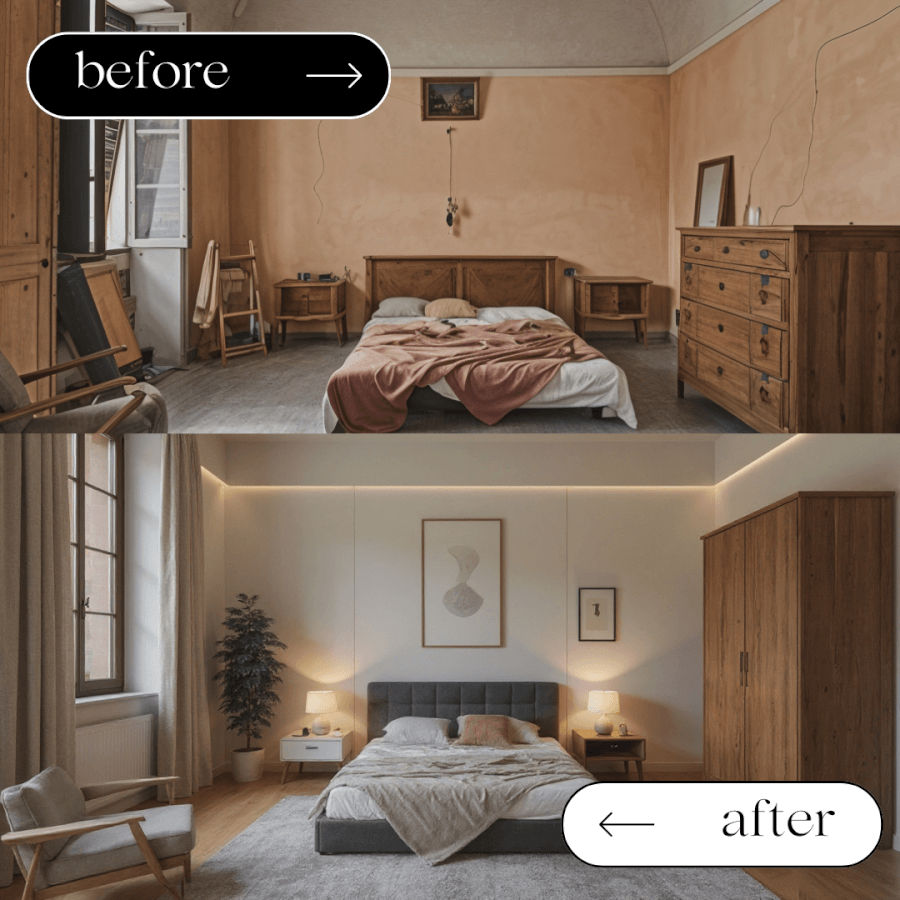
Real Estate Agents
Who are they: Professionals who need to create compelling marketing images that capture a property’s true potential and attract buyers quickly.
Their Workflow:
- Furniture Removal: They start by taking a photo of a cluttered or dated room and using this tool to instantly create a clean, empty canvas.
- Virtual Staging / Magic Redesign: With the room cleared, they use either our classic Virtual Staging tool or our newer, more powerful Magic Redesign to furnish the space. Both can create multiple attractive styles (Modern, Scandinavian, etc.) to appeal to the widest range of buyers.
- Precision+: For any minor client feedback, they use Precision+ to make real-time edits, ensuring the homeowner is happy with the marketing images.
- HD Button: Once the design is approved, they use the HD Button to upscale the image to a high-resolution, professional quality, ready for your clients.

Interior Designers
Who are they: Creative experts who translate a client’s vision into a beautiful and functional space, requiring tools for rapid ideation and precise collaboration.
Their Workflow:
- Redesign (Magic/Perfect/Beautiful): They start by uploading a photo of the client’s space and using one of the Redesign tools to generate several distinct conceptual directions. This quickly establishes a visual baseline for the client meeting.
- Precision+: During the client presentation, they use Precision+ to incorporate real-time feedback. If a client wants to see a larger rug, a different piece of art, or a lamp moved to another corner, it can be done instantly, making the client part of the creative process.
- Paint Visualizer, Material Swap & Colors & Textures: Once the layout is set, they finalize the core details. They use Paint Visualizer for walls, Material Swap for large surfaces like flooring or furniture, or the Colors & Textures tool to change the color or material of specific pieces like a single sofa or cushion.
- HD Button: With all details and edits approved, they hit the HD Button to generate a final, photorealistic render for the official client sign-off and for their professional portfolio.
Architects
Who are they: Visionaries who design buildings and spaces, needing to transform technical plans into emotive, realistic visuals that win project bids.
Their Workflow:
- Sketch to Render: They upload a house sketch or an interior sketch, and Sketch to Render instantly transforms the technical drawing into a fully realized, photorealistic image.
- Magic Redesign: To showcase versatility, they use Magic Redesign to show the same space with different architectural finishes, materials, or lighting conditions.
- Sky Colors: For exterior renderings, the Sky Colors tool is crucial for setting the mood, showing the building against a dramatic sunset or a clear afternoon sky.
- HD Button: The final, most compelling renders are upscaled with the HD Button for inclusion in high-stakes architectural bids and client presentations.
Property Developers
Who are they: Business leaders who manage large-scale construction projects and need a full suite of marketing visuals to secure off-plan sales or investment.
Their Workflow:
- Sketch to Render: They start by uploading the architectural plans for their house types. Sketch to Render transforms these technical drawings into a base set of beautiful, photorealistic images for the entire project.
- Magic Redesign: They take a base render and use Magic Redesign to quickly generate a variety of high-end interior design concepts with simple prompts, allowing them to define the perfect “look” for their target market.
- Design Transfer: Once they’ve perfected the signature style on one unit, they use Design Transfer to apply that same successful design to all the other unit types and layouts, ensuring a consistent and professional look across the entire development’s marketing materials.
- HD Button: All final images destined for high-end brochures, the development’s website, and large-format marketing banners are upscaled with the HD Button to ensure they look crisp, detailed, and luxurious.
Landscapers & Gardeners
Who are they: Outdoor design experts who help clients envision a lush, mature garden, often starting from an empty or undeveloped yard.
Their Workflow:
- Redesign / Magic Redesign: They start with a photo of the client’s current yard. They use a Redesign tool to instantly apply a specific style like “Zen” or “Modern,” or use Magic Redesign to follow a specific prompt like “a lush English garden with a stone path and a wooden bench.”
- Precision+: Once a base design is chosen, they use Precision+ to incorporate specific client requests, such as making a flower bed, moving a tree to a different spot, or adjusting the path of a walkway.
- Sky Colors: To showcase the design in different moods, and highlight features like landscape lighting, they use Sky Colors. This allows them to instantly change the atmosphere from a bright sunny afternoon to a dramatic twilight or a serene night.
- HD Button: The final garden design is upscaled with the HD Button, providing the client with a beautiful, inspiring, and high-resolution image of their future outdoor oasis.
Furniture Makers
Who are they: Artisans and businesses that create furniture and need to showcase their products in a variety of beautiful, realistic settings without costly photoshoots.
Their Workflow:
- Furniture Creator: They start by using a text prompt to bring a new concept to life or to create a perfect digital version of their physical products. This allows them to visualize a piece before it’s even built.
- Room Composer / Decor Staging: To place their creation in context, they use Room Composer to add the furniture to a variety of virtual rooms, or Decor Staging to place it into a specific scene or a client’s photo.
- Material Swap & Floor Editor: To create a perfectly coordinated scene, they use Material Swap or the Floor Editor. Crucially, they can upload their own textures, like a signature wood grain or a specific fabric swatch, and apply them to other elements in the room for a truly custom and branded image.
- HD Button: Every lifestyle shot is perfected and upscaled with the HD Button, allowing them to create a professional-grade product catalog and stunning marketing images without the expense of a physical photoshoot.
Your Workflow is Your Advantage
As you can see, from a real estate agent in Timișoara preparing a listing to an architect in London visualizing a skyscraper, the most successful professionals use HomeDesignsAI in a structured way. They don’t just use tools; they build powerful, repeatable workflows.
The core lesson is the same across every industry: this technology is here to amplify your skills, not replace them. It’s about automating the tedious work so you have more time to focus on your creative vision and your clients. Whether you’re a homeowner wanting to bring an idea to life or a property developer marketing an entire project, the right workflow is your ultimate competitive advantage.
Ready to build your own? Start designing with HomeDesignsAI today and discover your perfect workflow.