
Ramon M.

Unified Gallery, Improved Results & More: Major Update is Live

We’ve been busy behind the scenes, and a few days ago, we rolled out a set of exciting updates designed to make your HomeDesignsAI experience smoother, faster, and more inspiring than ever.

In this article, we’ll walk you through each new feature and improvement, explain what it does, and show you how it changes the way you work with your designs.

1. Unified Image Gallery – All Your Designs in One Place

The new Unified Image Gallery lets you view every uploaded and AI-generated image in a single, organized space.
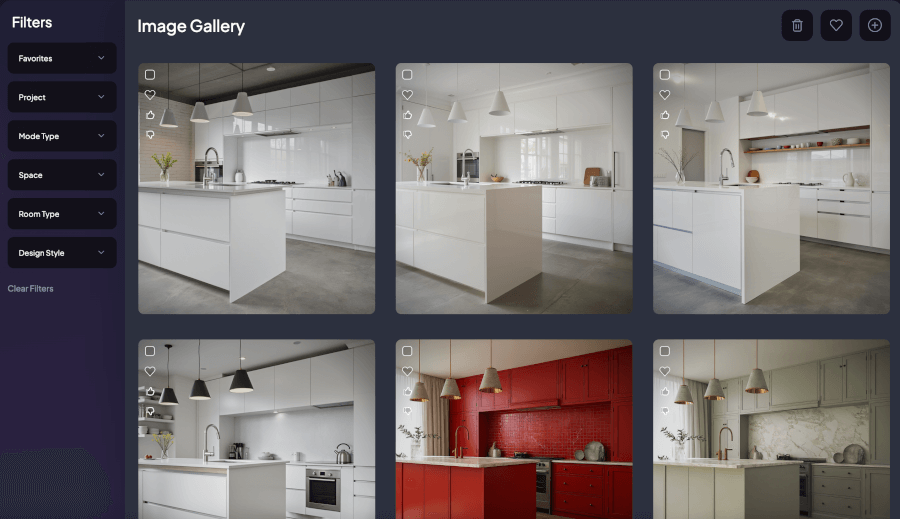
How the Unified Image Gallery looks

What’s new for you:

  • Centralized Image View – No more switching between each tool for photos; everything now lives in one location.

  • Smart Filtering – Instantly find what you’re looking for by filtering by design type, room type, or style.

  • Simplified Management – Tag, organize, and access your designs more easily than ever before.

Whether you’re a casual user or a pro working on multiple projects, this new gallery turns your creative archive into a powerful design library.

another look of the unified image gallery inside the tools

2. Upgrade Download Feature – Bigger, Better, Sharper

Your favorite images just got an instant glow-up. With the Upgrade Download feature, whenever you download an image, you’ll automatically have the option to upscale it for extra clarity and detail.

how the Upscale pop-up looks

Perfect for:

  • High-resolution printing

  • Client presentations

  • Zooming in on textures and details without losing quality

This means every AI-generated design you love is now ready for real-world use in the highest possible quality.

3. Improved Design Advisor – Smarter Suggestions, Better Results

The Design Advisor has been fine-tuned to give you more accurate, visually appealing, and helpful design recommendations.

See also  Unleash the Power of AI for Home Design: Meet the Ultimate AI House Designer

how the new Design Advisor looks

What’s new:

  • Better Visual Formatting – Cleaner layouts, improved readability, and better text.

  • Smarter Suggestions – The AI now considers style consistency, balance, and user intent to make suggestions that feel more “you.”

Whether you’re reimagining a room or designing from scratch, the upgraded Design Advisor helps you make better decisions faster, no matter your design experience.

4. More Realistic Colors & Textures

One of the most exciting updates: improved colors and textures for more natural, lifelike results.

a few results with the updated Colors & Textures

You’ll notice:

This upgrade is perfect for anyone who’s particular about details and wants their AI designs to translate beautifully into reality.

5. Smarter Masking for Precision Edits

Editing just got a major accuracy boost thanks to masking improvements. The AI now detects object edges with much greater precision—whether it’s the outline of a chair, the curves of a sofa, or even specific areas like kitchen countertops.

how the new masking works on random objects

Why this matters:

  • No more editing “spillover” into areas you didn’t want changed.

  • Cleaner swaps, additions, and removals for objects and materials.

  • More control when refining small details in your designs.

This is especially powerful when making targeted adjustments without redesigning an entire room.

Your HomeDesignsAI Experience, Leveled Up

These updates aren’t just tweaks, they’re upgrades designed to save you time, give you sharper, more realistic results, and make your creative process more enjoyable.

See also  How to Virtual Stage an Empty Room with AI

If you haven’t explored them yet, log in to your account today, go to your project, and see the difference. Your design workflow just got a whole lot smoother.

And stay tuned; we have some exciting new features coming soon that you won’t want to miss.

Popular Posts

Social Media

Explore more from our blog:

November Recap: Video Generation, Better Virtual Staging & More

With November officially over, we’re looking back at a month that was a bit different for us. With so many events happening, the holiday season fast approaching, and just trying to wrap things up before the year ends, we honestly couldn't focus 100% of our time on...

October Updates: 3D Floorplans, One-Click Removal & More

October is in full swing, and our team has been busy working on the next round of updates for our platform. We’re excited to share what we've been building, including some helpful new tools and a few features that came directly from your suggestions. From bringing...

New September Updates: Social Sharing, Smarter Editing & More

With summer winding down, our team has been focused on making steady improvements to our platform. This latest round of updates is all about refining your workflow and adding some helpful new features based on user feedback. In this post, we’ll walk you through what's...

[Case Study #2] Is AI a threat or an assistant? A top designer’s take

In the fast-paced world of interior design, over two decades of experience give you a certain perspective. For Ajah Beckton, founder of the acclaimed design firm Ja'Zine Interiors, it meant mastering the delicate dance of fabric samples, floor plans, and late-night...

The Conversation that Started it All (Our Origin Story)

Before we had millions of users, before we had a full suite of AI tools, and long before we were even called HomeDesignsAI, there was a simple, powerful idea. Like any good garden, our company has roots, and those roots trace back to one person: my dad. This isn't a...

[Guide] How Professionals Are Transforming Their Workflow w/ AI

With over 2 million users on HomeDesignsAI, we've seen the answer firsthand. A significant and growing portion of our community isn't just hobbyists; they are top-tier professionals in design, architecture, and real estate. Some are innovators, curious to see how AI...

[Case Study #1] Meet the Realtor Who’s Using Our AI to Sell Homes 40% Faster

What do you see when you look at an empty room? If you're a real estate agent, you might see potential. But for a buyer, an empty space can feel cold, daunting, and anything but a future home. This is the challenge that real estate agents face every day: selling a...

Flemish Style: The Elegance That Never Fades

Some styles fade with time, others evolve, but a rare few never lose their soul. Flemish style is one of them. Rooted in history but still deeply relevant today, this design language brings warmth, texture, and meaning into any home. In this article, we’ll explore the...

How to Design a Perennial Garden That Blooms Year After Year

Summer is the season when nature shows off, and if there’s one garden style that captures the spirit of effortless beauty and long-term reward, it’s the perennial garden. While many garden designs demand season-after-season effort, the perennial garden is all about...

How to Create a Balcony Garden and Boost Well-Being at Home

A balcony garden is one of the simplest ways to add colour, fresh air, and a little calm to apartment living. In the next few minutes, you’ll learn what makes a balcony garden special, why it can brighten your daily routine and improve your mental and physical health,...

Ready to redesign your home with AI?

Menu

Home

Blog

Pricing Plans

Affiliate Program

API

Enterprise

White Label Widget

Sitemap

Help Desk

API Documentation

Use Cases

Interior Design AI

Exterior AI

Landscaping AI

Furniture Replace AI

Real Estate AI

Virtual Staging AI

Cabinet Design AI

Wall AI

Flooring AI

Countertop AI

Architecture AI

Partial Remodel AI

Construction AI

Features

Redesign

AI Furniture Removal

Furniture Finder

Decor Staging

Colors & Textures

Fill Spaces

Material Swap

Sky Colors

Paint Visualizer

Room Composer

Inspiration

Interior Design Ideas

Exterior Design Ideas

Garden Design Ideas

Company

About Us

Press

Investors

Careers

Legal

Terms of Service

Privacy Policy

Refund Policy

Copyright 2025 HomedesignsAI. All Rights Reserved