
Staging a space has always been crucial in showcasing its full potential, whether for real estate listings, interior design projects, or home makeovers. With the rise of technology, the process has become more accessible and efficient. At HomeDesignsAI, we’ve taken it to the next level with the release of our Virtual Staging feature.
This new tool allows you to transform empty or outdated spaces into beautifully staged rooms in minutes. In this article, we’ll explore Virtual Staging, how it works, who it’s for, and how it compares to our other tools, like Fill Spaces.
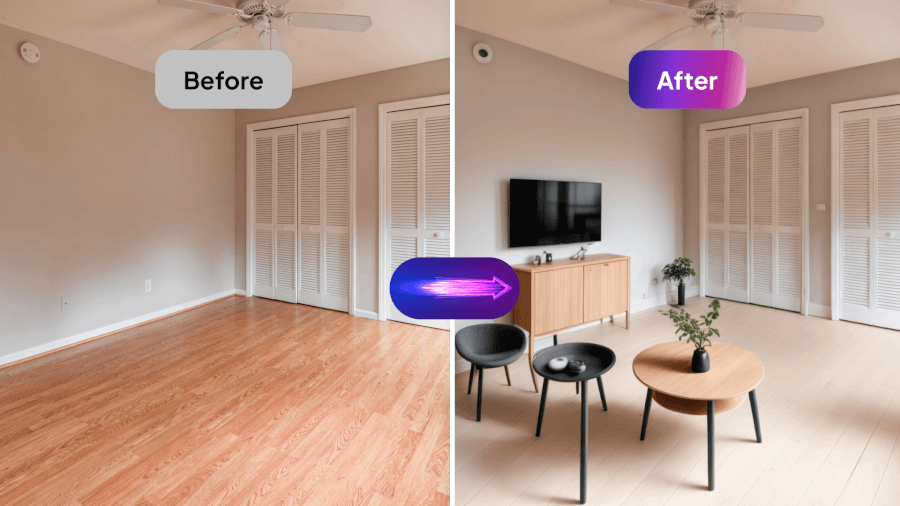
Introducing the Virtual Staging Tool
Virtual Staging is designed to simplify the staging process while maximizing creativity. With this tool, you can create fully furnished and decorated rooms, whether working with an empty space or looking to redesign an existing one.
The advanced AI analyzes your photo, identifies the room’s features, and generates a complete design tailored to your chosen style. It’s a game-changer for anyone looking to showcase spaces with ease and sophistication.
What Virtual Staging Can Do
Virtual Staging delivers powerful features to enhance your design projects:
- Full-Room Staging: Create complete room layouts with furniture, decor, and cohesive themes.
- Advanced AI Analysis: Ensure perfect perspective, accurate placement, and a realistic finish.
- Customizable Settings: Choose room types, design styles and provide additional instructions to tailor your designs.
- Realistic Visualization: Generate lifelike previews that showcase the full potential of your space.

Who Is Virtual Staging For?
Virtual Staging is a versatile tool suitable for a wide range of users:
- Real Estate Agents: To showcase empty or outdated properties with stunning staged visuals that attract potential buyers.
- Interior Designers: For creating polished concepts and presenting design ideas to clients in a professional, visually appealing way.
- Homeowners: To envision potential redesigns or renovations before committing to changes.
- Property Developers: To entice buyers to stage model homes or virtual showrooms in new developments.
- Content Creators: To enhance blogs, YouTube videos, and social media posts with captivating room designs.
- Event Planners: For visualizing and presenting venue layouts and decor concepts to clients.
- Furniture Retailers: To showcase how their products look in styled spaces, boosting customer confidence and sales.
- Photographers: For improving portfolio shots by staging empty or minimally furnished spaces with realistic designs.
- Rental Property Managers: To create appealing visuals for rental listings, attracting long-term tenants or vacation renters.
- Architects: To visualize interior layouts and decor as part of their architectural presentations or building plans.
How to Use the Virtual Staging Tool
To transform your space with Virtual Staging, follow these simple steps:
- Upload a clear, high-quality photo of your space. Ensure the image is well-lit for the best results.
- Select the room type (e.g., living room, bedroom, office) and choose your preferred design style.
- Add any specific instructions or preferences in the settings menu.
- Click Generate to let the AI analyze the photo and create a complete design. The tool stages the room with furniture, decor, and layout tailored to your preferences.
- Review the results, and if needed, refine the design with Precision+ for minor adjustments.
- Enhance the final image with the HD button to sharpen details, balance lighting, and elevate the overall quality.
Why Choose Virtual Staging AI
Virtual Staging AI sets itself apart with its ability to generate fully staged rooms quickly and efficiently. Unlike other tools that require manual input, this feature delivers cohesive and lifelike results in minutes. Its advanced AI ensures that every design element, from furniture placement to decor selection, feels natural and professional.
By choosing Virtual Staging, you can save time, reduce costs, and achieve stunning visuals that showcase the true potential of any space.
Virtual Staging vs. Fill Spaces
While both tools enhance your design projects, Virtual Staging is best for creating entire room layouts. It’s faster and more automated than Fill Spaces, which is ideal for manually adding specific furniture or decor elements to refine existing designs.
The Finishing Touch
Virtual Staging AI makes it easy to transform your vision into reality. With its advanced technology, customizable settings, and professional results, this tool empowers you to stage spaces with precision and creativity. Whether you’re redesigning a home, marketing a property, or exploring design possibilities, Virtual Staging simplifies the process and delivers stunning outcomes.