
Ramon M.

Sketch to Reality: Choose Your Sketch Style

Sketching has always been a cornerstone of design and creativity. It allows us to conceptualize, visualize, and bring ideas to life. At HomeDesignsAI, we’ve taken the beauty of sketching to the next level with our Sketch to Render tool, designed to turn your hand-drawn or digital sketches into stunningly realistic room or house designs in your preferred sketch style.

In this article, we’ll explore the history and significance of sketches, their role in design, and how our Sketch to Render tool helps you effortlessly bring your ideas to life.
Sketch to Reality: Choose Your Sketch Style

The Art and History of Sketching

Sketching is one of humanity’s oldest forms of creative expression, dating back to prehistoric cave drawings. Over centuries, sketches evolved from simple drawings into sophisticated tools for design and communication.

Who Used Sketches?

  1. Artists: Leonardo da Vinci’s intricate sketches of anatomy and machinery showcased their role in both art and science.
  2. Architects: Frank Lloyd Wright and other visionaries used sketches to conceptualize iconic buildings.
  3. Designers: From fashion to interiors, sketches became the go-to medium for brainstorming and communicating design ideas.
  4. Engineers: Used to create blueprints and prototypes for technological innovation.

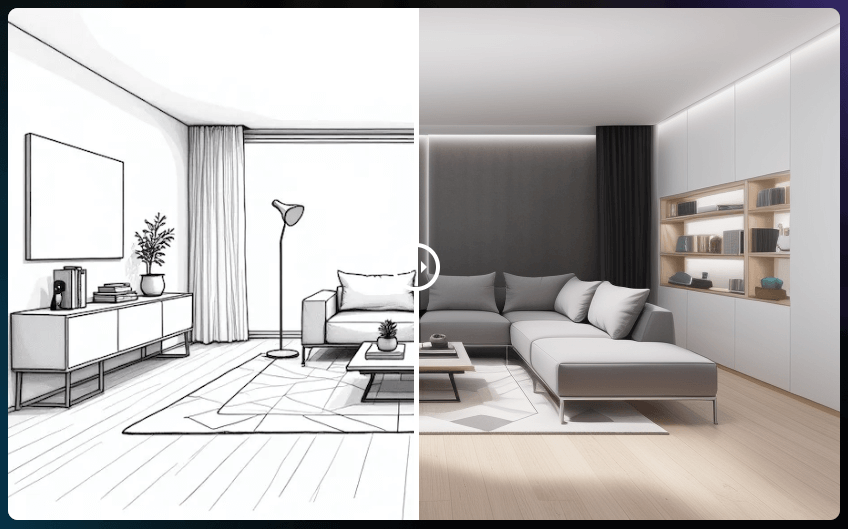
a sketch for a modern living room

Why Were Sketches Important?

  • Visualization: They allowed creators to visualize ideas before turning them into reality.
  • Communication: Sketches bridged the gap between the creator and their audience, clearly representing concepts.
  • Iteration: Quick and flexible, sketches made it easy to test and refine ideas.

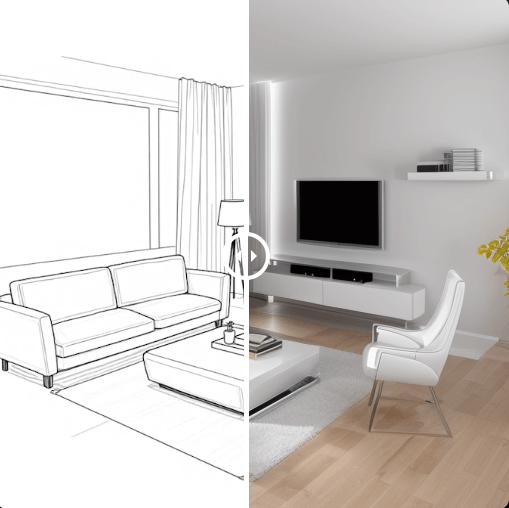
a modern living room designed from a sketch

Even today, sketching remains a fundamental tool for creativity, but with technological advancements, it has evolved into something much more powerful.

Sketching with Technology

With the rapid growth of artificial intelligence, transforming creative ideas into reality has become easier than ever. Traditional sketches, while invaluable, often required time and expertise to develop into polished designs. Tools like our Sketch to Render streamline this process, turning sketches into fully realized designs in minutes, all while staying true to your chosen sketch style.

See also  2025’s Top 10 Home Design Styles You’ll Want to Try

The Sketch to Render tool is a breakthrough for anyone looking to bring ideas to life. Whether you’re sketching a room layout, planning a renovation, or designing a new space, this tool effortlessly transforms your hand-drawn or digital sketches into realistic designs.

What Can the Sketch to Render Tool Do?

  • Transform Sketches into Spaces: Upload a sketch, and the AI generates a complete room or house design based on its structure and dimensions.
  • Style Integration: Choose from various design styles to bring your vision to life.
  • Visualize Realistic Designs: See lifelike renderings with textures, lighting, and decor that reflect your sketch.
  • Customizable Options: Add notes to tailor the AI output to your preferences.

Why It’s Revolutionary

  • Quick Results: Generate detailed designs in minutes.
  • User-Friendly: No drafting skills required—just upload a sketch.
  • Creative Freedom: Experiment with layouts and styles to match your vision.

a sketched living room transformed into a real living room

How to Use the Sketch to Render Tool

Here’s how you can turn your sketches into stunning designs with HomeDesignsAI:

1. Create or Upload a Sketch

Draw your room or house layout using pen and paper or a digital tool. The sketch doesn’t have to be perfect—our AI can work with simple outlines.

a bedroom made as a sketch

2. Upload Your Sketch

Log in to HomeDesignsAI and upload your sketch into the Sketch to Render tool.

3. Select a Room Type and Style

Start by selecting the type of room you’re designing. Next, choose from a variety of design styles that match your vision.

selecting the Room Type and the Design Style

4. Add Instructions

Provide additional notes or preferences, such as color palettes, furniture choices, or specific themes you want to include.

See also  November Recap: Video Generation, Better Virtual Staging & More

5. Generate Your Design

Click Generate, and let the AI analyze your sketch. In moments, you’ll receive a detailed, rendered design that brings your concept to life.

a sketch bedroom rendered as a real bedroom

6. Refine with Other Tools

Use features like Precision+ to tweak specific details or Colors & Textures to change the colors or materials.

7. Polish with the HD Button

Enhance the final render with the HD Button, ensuring sharp details, balanced lighting, and a professional finish.

a sketched bedroom rendered in real life

Bringing Your Sketches to Life

Sketching has always been a powerful way to capture and communicate ideas. With our Sketch to Render tool, this timeless practice meets cutting-edge AI technology, making it easier than ever to transform your creative concepts into stunningly realistic designs. Whether you’re an artist, designer, or homeowner, this tool allows you to create spaces that reflect your unique vision while staying true to your preferred sketch style.

Popular Posts

Social Media

Explore more from our blog:

November Recap: Video Generation, Better Virtual Staging & More

With November officially over, we’re looking back at a month that was a bit different for us. With so many events happening, the holiday season fast approaching, and just trying to wrap things up before the year ends, we honestly couldn't focus 100% of our time on...

October Updates: 3D Floorplans, One-Click Removal & More

October is in full swing, and our team has been busy working on the next round of updates for our platform. We’re excited to share what we've been building, including some helpful new tools and a few features that came directly from your suggestions. From bringing...

New September Updates: Social Sharing, Smarter Editing & More

With summer winding down, our team has been focused on making steady improvements to our platform. This latest round of updates is all about refining your workflow and adding some helpful new features based on user feedback. In this post, we’ll walk you through what's...

[Case Study #2] Is AI a threat or an assistant? A top designer’s take

In the fast-paced world of interior design, over two decades of experience give you a certain perspective. For Ajah Beckton, founder of the acclaimed design firm Ja'Zine Interiors, it meant mastering the delicate dance of fabric samples, floor plans, and late-night...

The Conversation that Started it All (Our Origin Story)

Before we had millions of users, before we had a full suite of AI tools, and long before we were even called HomeDesignsAI, there was a simple, powerful idea. Like any good garden, our company has roots, and those roots trace back to one person: my dad. This isn't a...

[Guide] How Professionals Are Transforming Their Workflow w/ AI

With over 2 million users on HomeDesignsAI, we've seen the answer firsthand. A significant and growing portion of our community isn't just hobbyists; they are top-tier professionals in design, architecture, and real estate. Some are innovators, curious to see how AI...

[Case Study #1] Meet the Realtor Who’s Using Our AI to Sell Homes 40% Faster

What do you see when you look at an empty room? If you're a real estate agent, you might see potential. But for a buyer, an empty space can feel cold, daunting, and anything but a future home. This is the challenge that real estate agents face every day: selling a...

Unified Gallery, Improved Results & More: Major Update is Live

We’ve been busy behind the scenes, and a few days ago, we rolled out a set of exciting updates designed to make your HomeDesignsAI experience smoother, faster, and more inspiring than ever. In this article, we’ll walk you through each new feature and improvement,...

Flemish Style: The Elegance That Never Fades

Some styles fade with time, others evolve, but a rare few never lose their soul. Flemish style is one of them. Rooted in history but still deeply relevant today, this design language brings warmth, texture, and meaning into any home. In this article, we’ll explore the...

How to Design a Perennial Garden That Blooms Year After Year

Summer is the season when nature shows off, and if there’s one garden style that captures the spirit of effortless beauty and long-term reward, it’s the perennial garden. While many garden designs demand season-after-season effort, the perennial garden is all about...

Ready to redesign your home with AI?

Menu

Home

Blog

Pricing Plans

Affiliate Program

API

Enterprise

White Label Widget

Sitemap

Help Desk

API Documentation

Use Cases

Interior Design AI

Exterior AI

Landscaping AI

Furniture Replace AI

Real Estate AI

Virtual Staging AI

Cabinet Design AI

Wall AI

Flooring AI

Countertop AI

Architecture AI

Partial Remodel AI

Construction AI

Features

Redesign

AI Furniture Removal

Furniture Finder

Decor Staging

Colors & Textures

Fill Spaces

Material Swap

Sky Colors

Paint Visualizer

Room Composer

Inspiration

Interior Design Ideas

Exterior Design Ideas

Garden Design Ideas

Company

About Us

Press

Investors

Careers

Legal

Terms of Service

Privacy Policy

Refund Policy

Copyright 2025 HomedesignsAI. All Rights Reserved