
Creating the perfect room layout can be challenging, especially when you’re trying to picture different decor elements and arrangements. At HomeDesignsAI, we understand how important it is to see a design come to life before making final decisions. That’s why we created the Room Composer tool, a powerful and easy-to-use feature that allows you to visualize specific decor items in your space so you can plan confidently.
In this article, I’ll explain how Room Composer works, what it is used for, and how it simplifies the design process.
Introducing the Room Composer Tool
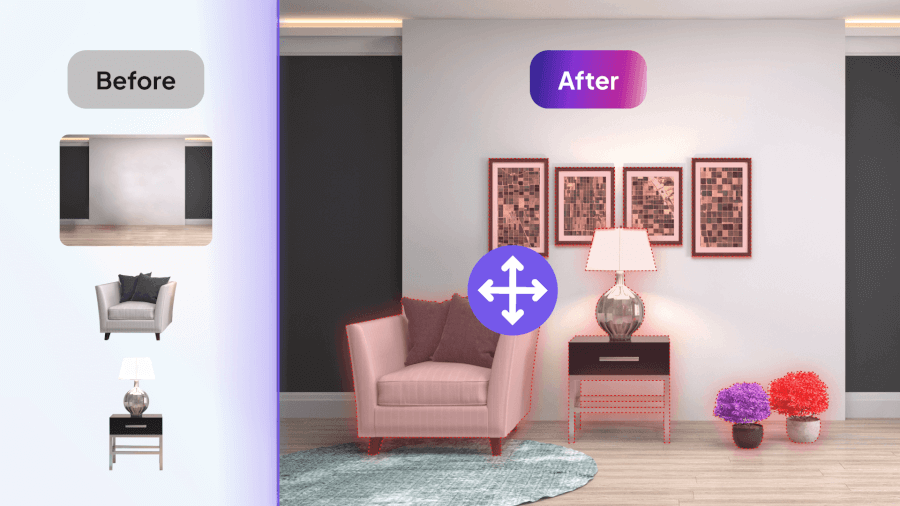
The Room Composer tool is crafted to help users seamlessly arrange decor items within a room, providing a realistic preview of how different elements will look in a space. Whether adding a new sofa, experimenting with wall art, or arranging a cozy reading nook, this tool allows you to visualize the design instantly and make confident choices.
What the Room Composer Tool Can Do
Room Composer is designed to bring both convenience and flexibility to room design. With just a few clicks, you can place and experiment with various decor items, transforming any space to match your unique vision.
Key Capabilities
- Object Placement: Position-specific decor items, such as furniture, artwork, or decorative accents, within your room layout.
- Preset and Custom Options: For personalized staging, you can choose from a library of decor presets or upload custom items with transparent backgrounds.
- Realistic Visualization: Enjoy a true-to-life preview of how each decor item will look within your space, ensuring everything fits together perfectly.

Who is the Room Composer Tool For?
The Room Composer tool is ideal for anyone looking to create thoughtfully-curated spaces. Here’s how different users can benefit:
- Homeowners: Perfect for those who want to experiment with furniture layouts and decor without committing to moving heavy items.
- Interior Designers: Offers a quick way to test and refine different design concepts, giving clients a clear vision of potential layouts.
- Realtors: An effective tool for virtual staging, allowing for furniture and decor placement in empty rooms to enhance listings.
- DIY Decorators: Great for those who enjoy hands-on projects, as they enable easy rearrangements and decor exploration.
- Event Planners: They are useful for visualizing and arranging decor in venues, helping to plan cohesive setups for various events.
How to Use the Room Composer Tool
Getting started with Room Composer is simple and intuitive. Here’s a step-by-step guide to help you set up your room design:
- Upload a Room Image: First, upload a high-quality image of the room where you want to place the decor. Well-lit images with clear lines yield the best results.
- Upload an Object Image: Add an image of the decor item you want to place. For a seamless look, make sure the object has a transparent background.
- Object Analysis: Our AI analyzes the room image to identify the walls, floors, and surfaces available for placing objects.
- Position the Object: Use the manual positioning tool to drag and drop the item into the desired spot. Adjust its size, angle, and position as needed for a natural fit.
- Customize Object Appearance:
- Preset Options: Browse through our extensive library of preset decor items, from sofas to wall art.
- Upload Custom Decor: If you have a specific item in mind, upload your own decor images to see how they’ll look in the space.
- Generate Design: Click Generate New Designs to see your objects realistically staged within the room, helping you visualize the final setup.
Tips and Tricks for Room Composer
To make the most of the Room Composer tool, consider these helpful tips:
- Use High-Quality Images: Clear, well-lit images enhance the realism of staged decor items in your room.
- Experiment with Object Placement: Try out multiple layouts and placements to find the one that best suits your vision.
- Manual and Automatic Selection: Use automatic positioning for a quick setup, and fine-tune with manual controls for added precision.
- Enhance Resolution: For a polished finish, use the HD button to improve image clarity and detail.
The Finishing Touch
The Room Composer tool is a game-changer for anyone looking to design or redecorate their space. With this tool, you can quickly and easily try out different layouts and decor ideas, bringing your vision to life without the hassle of moving physical objects. Room Composer simplifies the process, helping you confidently create spaces that feel just right.
If you’re interested in learning more ways to enhance your design projects, be sure to check out our latest article here for more inspiration.